ch07.深入IO
- IOStream 概述
- 输入与输出
- 文件与内存操作
- 流的状态、定位与同步
推荐书籍:Standard C++ IOStream and Locales
一.IOStream 概述
- IOStream 采用流式 I/O 而非记录 I/O ,但可以在此基础上引入结构信息
- 所处理的两个主要问题
- 表示形式的变化:使用格式化 / 解析在数据的内部表示与字符序列间转换
- 与外部设备的通信:针对不同的外部设备(终端、文件、内存)引入不同的处理逻辑
- 所涉及到的操作
- 格式化 / 解析
- 缓存
- 编码转换
- 传输
- 采用模板来封装字符特性,采用继承来封装设备特性
- 常用的类型实际上是类模板实例化的结果
二.输入与输出
- 输入与输出分为格式化与非格式化两类
- 非格式化 I/O :不涉及数据表示形式的变化,使用方法查阅cppreference
- 常用输入函数: get / read / getline / gcount
- 常用输出函数: put / write
 int main(){
int x;
std::cin >> x ;
std::cout<< x << std::endl;
----
int x;
std::cin.read(reinterpret_cast<char*>(&x), sizeof(x));//非格式化的输入
std::cout<< x << std::endl;//诡异的输出
----
//有时非格式化的输入也是有用的
float y = 3.1415;
std::cout<< y << std::endl;//3.1415
 }
int main(){ char a = '0'; int x = static_cast<char>(a); std::cout<< a << std::endl; std::cout<< x <<std::endl; }
- 格式化 I/O :使用移位操作符来进行的输入 (») 与输出 («)
- C++ 通过操作符重载以支持内建数据类型的格式化 I/O
- 可以通过重载操作符以支持自定义类型的格式化 I/O
- 格式控制
- 可接收位掩码类型( showpos )、字符类型( fill )与取值相对随意( width )的格式化参数
- 注意 width 方法的特殊性:触发后被重置
int main(){
  char a = '0';
  int x = static_cast<char>(a);
  std::cout.setf(std::ios_base::showpos)//显示正数前面的正号
  std::cout.width(10);//设置输出宽度,结果:         0
  std::cout.fill('.'');//设置输出宽度结果:.........0
  std::cout<< a << std::endl;
  std::cout<< x <<std::endl;//打印x时候就没有格式输出了:width 方法的特殊性:触发后被重置
}
- 操纵符
- 简化格式化参数的设置
- 触发实际的插入与提取操作
int main(){
  char a = '0';
  int x = static_cast<char>(a);
  //简化格式化参数
  std::cout<< std::showpos<< a << '\n << x << std::endl;
  std::cout<< std::showpos<< << setw(10)<< std::setfill('.')
           << a << '\n << x << std::endl;
- 提取会放松对格式的限制
int main(){ int x; std::cin>> x;//+10, +010, std::cout<< x <<'\n';//输出均为10 } - 提取 C 风格字符串时要小心内存越界
 int main(){
   char x[5];
   std::cin>> x;//abcdefg
   std::cout<< x <<'\n';//崩溃
   -----
   char x[5];
   std::cin>> std::setw(5) >> x;//abcdefg
   std::cout<< x <<std::endl;// 程序崩溃abcd
 }
三.文件与内存操作
3.1.文件操作
- basic_ifstream / basic_ofstream / basic_fstream
- 文件流可以处于打开 / 关闭两种状态,处于打开状态时无法再次打开,只有打开时才能 I/O
#include<iostream>
#include<string>
#include<fstream>

int main(){
  std::ofstream outFile("my_file");
  outFile << "Hello,world!";
  std::cout<<outFile.is_open()<<std::endl;
  outFile.close();

  std::ifstream inFile("my_file");
  std::string x;
  inFile >> x;
  std::cout<< x <<std::endl;

  -----
  std::ifstream inFile;
  inFile.open("my_file");//也可以打开文件
  inFile.close();

  -----
  //在域里面有效
  {//可以不用open close函数,在域里面有效
    std::ofstream outFile("my_file");
    outFile << "Hello";
  }//至此隐式关闭

}
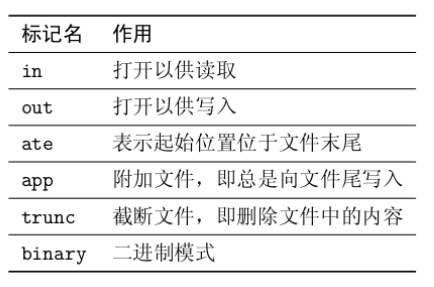
3.2.文件流的打开模式(图引自 C++ IOStream 一书)
- 每种文件流都有缺省的打开方式
- 注意 ate 与 app 的异同
#include<iostream> #include<string> #include<fstream> int main(){ //ate表示起始位置位于文件末尾 std::ifstream inFile("my_file", std::ios_base::in | std::ios_base::ate); ----- std::ofstream outFile("my_file"); outFile << "world!";//刷新文档中的内容,默认trunc模式 ----- //app,从文件末尾开始写 std::ofstream outFile("my_file", std::ios_base::out | std::ios_base::app); } - binary 能禁止系统特定的转换
- 避免意义不明确的流使用方式(如 ifstream + out )
3.3.合法的打开方式组合(引自 C++ IOStream 一书)
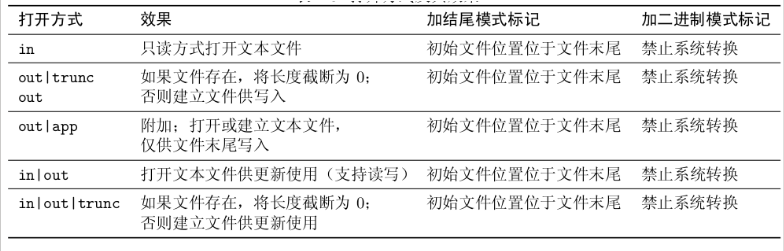
line1:ifstrea; line2,3:ofstream; line4,5:fstream;
3.4.其他
- 内存流: basic_istringstream / basic_ostringstream / basic_stringstream
#include<iostream> #include<string> #include<sstream> #include<iomaning> int main(){ //输出流 std::ostringstream obj1; obj1<< std::ios_base::setw(10) << std::ios_base::setfill('.') << 10; std::string res = obj.str();//"12345" std::cout<< res << std::endl; //输入流 std::istringstream obj2(res); int x; obj2 >>x; std::cout<< x << std::endl; } - 也会受打开模式: in / out / ate / app 的影响
- 使用 str() 方法获取底层所对应的字符串
- 小心避免使用 str().c_str() 的形式获取 C 风格字符串
```c
#include
#include #include #include
int main(){ //输出流 std::ostringstream buf2(“test”); buf2 « ‘1’; auto res = buf2.str(); auto c_res = res.c_str(); } ```
- 小心避免使用 str().c_str() 的形式获取 C 风格字符串
```c
#include
- 基于字符串流的字符串拼接优化操作
  #include<iostream>
  #include<string>
  #include<sstream>
  #include<iomaning>

  int main(){
    //输出流
    std::string x;
    x += "Hello";
    x += ", world!";
    x += "Hello";
    x += ", world!";// 性能较差

    //修改
    std::ostringstream ostr;
    ostr << "Hello";
    ostr << ", world!";
    ostr << "Hello";
    ostr << ", world!";// 性能更优
    std::string y = ostr.str();

  }
四.流的状态、定位与同步
4.1.流的状态
- iostate(流的状态有四种)
- failbit / badbit / eofbit / goodbit
- goodbit 无错误
- badbit 不可恢复的流错误
- failbit 输入/输出操作失败(格式化或提取错误)
- eofbit 关联的输入序列已抵达文件尾
```c
#include
int main(){ std::ofstream outFile;//正常 outFile « 10;//错误,因为输出流outFile没有关联到任何文件上 //此时的错误就是badbit
int x; std::cin»x;//键盘输入”Hello” //此时的错误就是failbit std::ofstream outFile;//正常 outFile.close();//已经是关闭状态,再次对他进行关闭,报错failbit
int x; std::xin»x;//ctrl + d } ```
- failbit / badbit / eofbit / goodbit
- 检测流的状态
- good( ) / fail() / bad() / eof() 方法
- 转换为 bool 值( 参考 cppreference ):参考中的表格十分重要,可以推断输出是什么
```c
#include
int main(){ int x; std::xin»x; std::cout«std::cin.good()«’ ‘ «std::cin.fail()«’ ‘ «std::cin.bad()«’ ‘ «std::cin.eof()«’ ‘ «static_cast
(std::cin)<<'\n'; //输入数字10:1 0 0 0 1 //输入字符串Hello:0 1 0 1 0 } ``` - 注意
- 转换为 bool 值时不会考虑 eof
- fail 与 eof 可能会被同时设置,但二者含意不同
-
通常来说,只要流处于某种错误状态时,插入 / 提取操作就不会生效
- 设置流状态
- clear :设置流的状态为具体的值(缺省为 goodbit )
- setstate :将某个状态附加到现有的流状态上
- 捕获流异常:exceptions方法F
4.2.流的定位
- 获取流位置
- tellg() / tellp() 可以用于获取输入 / 输出流位置 (pos_type 类型 )
tellg–>get,tellp–>put
#include <iostream> #include <sstream> int main() { std::ostringstream s; std::cout << s.tellp() << '\n'; s << 'h'; std::cout << s.tellp() << '\n'; s << "ello, world "; std::cout << s.tellp() << '\n'; s << 3.14 << '\n'; std::cout << s.tellp() << '\n' << s.str(); } /* 0 1 13 18 hello, world 3.14 */ - 两个方法可能会失败,此时返回 pos_type(-1)
- tellg() / tellp() 可以用于获取输入 / 输出流位置 (pos_type 类型 )
tellg–>get,tellp–>put
- 设置流位置
- seekg() / seekp() 用于设置输入 / 输出流的位置(不是插入,而是从位置开始进行覆盖)
- 这两个方法分别有两个重载版本:
- 设置绝对位置:传入 pos_type 进行设置
- 设置相对位置:通过偏移量(字符个数 ios_base::beg ) + 流位置符号的方式设置
- ios_base::beg
- ios_base::cur
- ios_base::end
```c
#include
#include #include
int main() { std::string str = “Hello, world”; std::istringstream in(str); std::string word1, word2;
in >> word1;
in.seekg(0); // 回溯
in >> word2;

std::cout << "word1 = " << word1 << '\n'
          << "word2 = " << word2 << '\n'; } 输出: word1 = Hello, word2 = Hello,  ```
4.3.流的同步
- 基于 flush() / sync() / unitbuf 的同步
- flush() 用于输出流同步,刷新缓冲区
- sync() 用于输入流同步,其实现逻辑是编译器所定义的
- 输出流可以通过设置 unitbuf 来保证每次输出后自动同步
```c
#include
#include #include
int main(){ std::cout«“what’s your name?\n”; std::string name; std::cin » name; //实现刷新缓冲区
//flush() 输出流同步:典型应用:需要吧内容显示到终端上, //或则保存到文件里,则可以调用flush进行输出同步 std::cout«“what’s your name?\n”; std::cout«“what’s your name?\n”«std::flush; //同上,不太建议,不适用缓冲区,直接打印到终端 std::cout«std::unitbuf«“what’s your name?\n”; std::cout.flush();//作用同上
//sync() 输入流同步:典型应用:打开一个文件的同时,可能有其他程序在对 //改程序进行写入,此时可以使用sync()进行输入流同步,更新读取的内容(多线程) } ```
- 基于绑定 (tie) 的同步
- 流可以绑定到一个输出流上,这样在每次输入 / 输出前可以刷新输出流的缓冲区
- 比如: cin 绑定到了 cout 上
A–>C A–>D A绑定到C上,A可以是输入流可以是输出流,但C必须为输出流,如果A再绑定到D上,则不再绑定到C上; 既是,一个流只能绑定到一个输出流上.但可以多对一. B–>C 不同的流可以同时绑定到同一个输出流上.
#include<iostream> #include<string> #include<fstream> int main(){ std::cout<<"what's your name?\n"; std::string name; std::cin >> name;//使用cin进行输入时就刷新了cout的缓冲区 //实现刷新缓冲区 } ------------- #include <iostream> #include <fstream> #include <string> //模拟了cin与cout的缓冲 int main() { std::ofstream os("test.txt"); std::ifstream is("test.txt");//指定了同一个文件 std::string value("0"); os << "Hello"; is >> value; //"0",缓冲区没有进行绑定,缓冲区还没有写入到文件里 std::cout << "Result before tie(): \"" << value << "\"\n"; is.clear(); is.tie(&os);//进行绑定,将缓冲区写入文件中 is >> value; std::cout << "Result after tie(): \"" << value << "\"\n"; } 输出: Result before tie(): "0" Result after tie(): "Hello" - 与 C 语言标准 IO 库的同步
- 缺省情况下, C++ 的输入输出操作会与 C 的输入输出函数同步
- 可以通过 sync_with_stdio 关闭该同步