ch13-模板
- 函数模板
- 类模板与成员函数模板
- Concepts
- 模板相关内容
一.函数模板
1.1.使用 template 关键字引入模板
使用 template 关键字引入模板: template void fun(T) {...}
}
int main(){
}
##  1.2.函数模板的显式实例化: fun<int>(3)
- 实例化会使得编译器产生相应的函数(函数模板并非函数,不能调用)
- ==函数模板中包含了两对参数:函数形参 / 实参;模板形参 / 实参,调用是两个形参都要对应赋值,一个使用尖括号<>,一个使用圆括号()==
```c
#include<iostream>

// template<class T>
template<typename T>
void fun(T input){
  std::cout<<input<<std::endl;

}

int main(){
  fun<int>(3);//显示实例化
  - T : 模板形参
  - int : 模板实参(用int 代替T)
  - T <---> int    模板的形参<--->实参
  - input : 函数形参
  - 3 : 函数实参(用3 代替 input)
  - input<--->3    函数的形参<--->实参
}
#include<iostream>
struct Str(){

};
// template<class T>
template<typename T>
void fun(T input){
  std::cout<<input<<std::endl;
}

int main(){
  fun<Str>(Str{});//模板实例化的时候报错,语法没错,因为Str没有定义如何打印输出,也就是说在实例化的时候,系统会回过头去再次检查模板函数,这样就需要模板函数的定义与实例化在同一翻译单元可见.
}
- 模板必须在实例化时可见 —— 翻译单元的一处定义原则
```c
//header.h
#include
// template
template
void fun(T input){
std::cout<<input<<std::endl;
}//这个函数不会报错,C++做了扩展,在头文件进行实现:在翻译单元可见
void normal_fun(){
}//链接错误:source.cpp和main.cpp都包含了这个头文件,header没加#ifndef,,,这个操作,会被重复定义
//source.cpp
#include
#include
void g(){
fun(100);
}
//main.cpp
#include
#include
int main(){
fun(3);
}
- 注意与内联函数的异同

内联函数与模板函数均需要在头文件中进行实现,但是这样做的原因不同:内联函数是便于在调用他的地方展开,模板函数是需要在同一翻译单元可见.


##  1.3.函数模板的重载

```c
#include<iostream>

// template<class T>
template<typename T>
inline void fun(T input){
  std::cout<<input<<std::endl;
}

//这就是函数模板的重载,函数名均为fun()
template<typename T1, typename T2>
inline void fun(T1 input1, T2 input2){
  std::cout<<input1<<std::endl;
  std::cout<<input2<<std::endl;
}

//这也是函数模板的重载,函数参数列表不同:形参类型不同
template<typename T>
inline void fun(T* input){
  std::cout<<*input<<std::endl;
}
int main(){
  int x = 3;
  fun<int>(&x);
}
1.4.模板实参的类型推导
模板实参的类型推导参考文献. 可以使用cpp insight进行查看具体的实例化是怎样的
隐式实例化
#include<iostream>
// template<class T>
template<typename T>
inline void fun(T input){
  std::cout<<input<<std::endl;
}
int main(){
  fun(3);//3,同样可以打印出3,这里实际上就有隐式实例化的过程
  - 根据函数实参3,进行模板实参类型的推导
}
-
如果函数模板在实例化时没有显式指定模板实参,那么系统会尝试进行推导
-
==推导是基于函数实参(表达式)确定模板实参的过程==,其基本原则与 auto 类型推导相似
- 函数形参是左值引用 / 指针:
- 忽略表达式类型中的引用
- 将表达式类型与函数形参模式匹配以确定模板实参
```c
#include
// template
template
inline void fun(T& input){//函数形参是左值引用
std::cout<<input<<std::endl;
}
int main(){
int y = 3;
int& x = y;//推导过程首先忽略int& 这个引用
fun(x);
- 函数形参是==万能引用(既可以引用左值也可以引用右值)==
- 如果实参表达式是右值,那么模板形参被推导为去掉引用的基本类型
- 如果实参表达式是左值,那么模板形参被推导为左值引用,触发引用折叠: int& && -> int&
#include<iostream>
// template<class T>
template<typename T>
inline void fun(T&& input){//函数形参是万能引用(既可以引用左值,也可以引用右值),不是右值引用
  std::cout<<input<<std::endl;
}
int main(){
  fun(3);
  int&& x=3;
}
- 函数形参不包含引用,==其实推导会更复杂==
- 忽略表达式类型中的引用
- 忽略顶层 const
- 数组、函数转换成相应的指针类型
```c
#include
// template
template
inline void fun(T input){
std::cout<<input<<std::endl;
}
int main(){
int x = 3;
const int& ref = x;
fun(ref);
- T: const int& –> const int –> int
}
c
#include
// template
template
inline void fun(T input){
}
int main(){
int x = 3;
const int* const ptr = &x;
fun(ptr);
- T: const int* const –> const int*
}
c
#include
// template
template
inline void fun(T input){
}
int main(){
int x[3] ;
fun(x);
- T: int[3] –> int*
}
c
#include
// template
template<typename T, typename T2>
inline void fun(T input, T2 input2){
}
int main(){
fun(3,5);
- 也是合法的,int匹配第一个模板形参,此时既有显示实例化也有隐式实例化
}
```
1.5.模板实参并非总是能够推导得到
-
如果模板形参与函数形参无关,则无法推导
#include<iostream>
// template<class T>
template<typename T,typename Res>
Res fun(T input){
}
int main(){
  fun(3);//无法推导返回类型
}
-
即使相关,也不一定能进行推导,推导成功也可能存在因歧义而无法使用
#include<iostream>
// template<class T>
template<typename T>
void fun(unsigned input = sizeof(T)){
}
int main(){
  fun(3);//无法推导
}
```c
#include
#include
// template
template
void fun(typename std::remove_reference::type input){
- std::remove_reference::type input 去掉引用的功能
}
int main(){
fun(3);//无法推导
}
```
1.6.在无法推导时,编译器会选择使用缺省模板实参
1.8.函数模板制动推导时会遇到的几种情况
1.9.函数模板的实例化控制
-
显式实例化定义: template void fun(int) / template void fun(int)</font>
```c
//header.h
#include
#include
template
Res fun(T x){
std::cout<<x<<std::endl;
}
template//注意这里没有尖括号
void fun(int x);//显示实例化定义:T = int
template//注意这里没有尖括号
void fun(int x);//同样是显示实例化定义:T = int
- 在外部调用时,就可以直接调用预先实例化好的模板函数
//mian.cpp
- 在生成库文件进行使用时,若模板函数被封装成了库,则无法进行动态实例化?需要对函数模板进行显示实例化定义,但暂时不调用
#include "header.h"
int main(){
int x = 3;
fun(x);//显式实例化
}
```
-
显式实例化声明: extern template void fun(int) / extern template void fun(int)</font>
```c
#include
template
Res fun(T x){
std::cout<<x<<std::endl;
}
extern template//注意这里没有尖括号,显示实例化声明
void fun(int x);
int main(){
int x = 3;
fun(x);//显式实例化
}
```
- 注意一处定义原则(video 89-4-21.00)
- 注意实例化过程中的模板形参推导(video 89-4-21.00)
1.10.函数模板的 ( 完全 ) 特化
函数模板的 ( 完全 ) 特化: template<> void f(int) / template<> void f(int) -->注意区别前面的显示实例化定义和声明,此处有尖括号<></font>
- 并不引入新的(同名)名称,只是为某个模板针对特定模板实参提供优化算法(==特化:模板函数无法满足算法需求,但是可以根据模板函数就行扩展更改==)
- 注意与重载的区别
- 注意特化过程中的模板形参推导
```c
#include
template
void fun(T x){
//...
}
template
void fun(T* x){//函数模板重载
//...
}
template<>//不会引入同名名称,只是模板函数的一个特例
void fun(int){
}
int main(){
}
```
## 1.10.避免使用函数模板的特化-video-90-2
避免使用函数模板的特化[参考资料](https://www.youtube.com/watch?v=GydNMuyQzWo&list=PLHTh1InhhwT6DdPY3CPxayypP5DXek_vG&index=8).
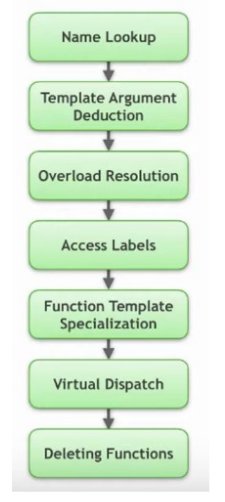
- 不参与重载解析,会产生反直觉的效果(video-90-2-3.00)
- 通常可以用重载代替函数模板的特化
- 一些不便于重载的情况:无法建立模板形参与函数形参的关联
- 使用 if constexpr 解决
- 引入 “ 假 ” 函数形参
- 通过类模板特化解决
## 1.11.(C++20) 函数模板的简化形式
函数模板的简化形式:使用 auto 定义模板参数类型
- 优势:书写简捷
- 劣势:在函数内部需要间接获取参数类型信息
```c
#include
#include
template
void fun(T x){
//...
}
//注意这是C++ 20的新特性,则就表示的是模板函数
void fun(auto x){
//...
}
int main(){
int x;
fun(&x);
}
```
# 二. 类模板与成员函数模板
## 2.1.使用 template 关键字引入模板
使用 template 关键字引入模板: template class B {...};
```c
#include
#include
template
class B
{//类模板定义
};
template
class B;//类模板声明
int main(){
B x;
B y;
}
```
- 类模板的声明与定义 —— 翻译单元的一处定义原则
- 成员函数只有在调用时才会被实例化
```c
#include
#include
template
class B
{//类模板定义
public:
void fun(T input){
std::cout<< input<< std::endl;
}
};
template
class B;//类模板声明
int main(){
B x;
x.fun(3);
}
```
- 类内类模板名称的简写
```c
#include
#include
template
class B
{//类模板定义
public:
auto fun(T input){
return B{};
//return B{};//可以这样简写
}
};
int main(){
B x;
x.fun();
}
```
- 类模板成员函数的定义(类内、类外)
```c
#include
#include
template
class B
{//类模板定义
public:
void fun(){
}
};
template
void B::fun(){
//类模板的成员函数在类外定义方式
}
int main(){
B x;
x.fun();
}
```
## 2.2.成员函数模板
- 类的成员函数模板
```c
#include
#include
class B
{//类模板定义
public:
template
void fun(){//类内定义
}
};
int main(){
B x;
x.fun();
}
```
```c
#include
#include
class B
{//类模板定义
public:
template
void fun();
};
template
void B::fun(){
//类的成员函数模板在类外定义方式
}
int main(){
B x;
x.fun();
}
```
- 类模板的成员函数模板
```c
#include
#include
template
class B
{//类模板定义
public:
template
void fun(){}//内类定义
};
int main(){
B x;
x.fun();
}
```
```c
#include
#include
template
class B
{//类模板定义
public:
template
void fun();
};
template
template
void B::fun(){
//内外定义
}
int main(){
B x;
x.fun();
}
```
## 2.3.友元函数(模板)
- 可以声明一个函数模板为某个类(模板)的友元
```c
#include
#include
template
void fun();
template
class B
{
template
friend void fun(){
}
int x;
};
template
void fun(){
//定义
B tmp1;
tmp1.x;
}
int main(){
fun();
}
```
- C++11 支持声明模板参数为友元--用处不是那么大
## 2.4.类模板的实例化
[类模板的实例化](https://en.cppreference.com/w/cpp/language/class_template).
- 与函数实例化很像
- 可以实例化整个类,或者类中的某个成员函数
## 2.5.类模板的(完全)特化 / 部分特化(偏特化)--重要
- 特化版本与基础版本可以拥有完全不同的实现
```c
#include
#include
template
class B
{
void fun(){
std::cout<<"1\n";
}
int x;
};
template<>
class B
{
void fun(){
std::cout<<"2\n";
}
int x;
};
template<>
class B
{
void fun2(){//完全不同
std::cout<<"2\n";
}
int x;
};
int main(){
B x;//调用特化版本
x.fun();//2
B x;//调用M原有模板版本
x.fun();//1
}
```
==部分特化==
```c
#include
#include
template<typename T, typename T2>
class B
{
void fun(){
std::cout<<"1\n";
}
int x;
};
template
class B<int, T2>//部分特化
{
void fun2(){
std::cout<<"2\n";
}
int x;
};
int main(){
B<int,double> x;//调用部分特化版本
x.fun2();//2
}
```
```c
#include
#include
template
class B
{
void fun(){
std::cout<<"1\n";
}
int x;
};
template
class B<T*>//部分特化
{
void fun2(){
std::cout<<"2\n";
}
int x;
};
int main(){
B<int*> x;//调用部分特化版本
x.fun2();//2
}
```
## 2.6.类模板的实参推导(从 C++17 开始)
- 基于构造函数的实参推导
```c
#include
#include
template
class B
{
B(T input){}
void fun(){
std::cout<<"1\n";
}
int x;
};
int main(){
B x(3);//基于构造函数的实参推导:构造时为int,T==int
}
```
- [用户自定义的推导指引](https://www.shenlanxueyuan.com/course/329/task/11704/show)
std::pair x{3,3,14};//std::pair<int,double>
- 注意:引入实参推导并不意味着降低了类型限制!
- C++ 17 之前的解决方案:引入辅助模板函数
# 三.[Concepts(概念)](https://zh.cppreference.com/w/cpp/language/constraints)
## 3.1.模板的问题:没有对模板参数引入相应的限制
- 参数是否可以正常工作,通常需要阅读代码进行理解
- 编译报错友好性较差 (vector<int&>)
```c
#include
#include
template
void fun(){
//...其实并不知道T的限制,不知道T支持哪些操作
}
int main(){
}
```
## 3.2.( C++20 ) Concepts :编译期谓词,基于给定的输入,返回 true 或 false
- 与 constraints ( require 从句)一起使用限制模板参数
- 通常置于表示模板形参的尖括号后面进行限制
```c
#include
#include
template
concept IsAvail = std::is_same_v<T,int> || std::is_same_v<T,float>;
int main(){
std::cout<<IsAvail<<std::endl;//1
std::cout<<IsAvail<<std::endl;//0
}
```
```c
#include
#include
template
concept IsAvail = std::is_same_v<T,int> || std::is_same_v<T,float>;
template
requires IsAvail// requires 从句
void fun(T input){
}
int main(){
fun(3);//合法
fun(true);//非法:true不满足IsAvail
}
```
## 3.3.Concept 的定义与使用
- 包含一个模板参数的 Concept
- 使用 requires 从句
- 直接替换 typename
```c
#include
#include
template
concept IsIntOrFloat = std::is_same_v<T,int> || std::is_same_v<T,float>;
template//直接替换 typename
void fun(T input){
}
int main(){
fun(3);//合法
fun(true);//非法:true不满足IsIntOrFloat
}
```
- 包含多个模板参数的 Concept
- 用做类型 constraint 时,少传递一个参数,推导出的类型将作为首个参数
```c
#include
#include
template
concept IsAvail = std::is_same_v<T,T2> ;
template
void fun(T input){
}
int main(){
std::cout<<IsAvail<int,char><<std::endl;//0
}
```
```c
#include
#include
template<typename T, typename T2>
concept IsAvail = !std::is_same_v<T,T2> ;
template<typename T, typename T2>
requires IsAvail<T, T2>// requires 从句
void fun(T input1, T2 input2){
}
int main(){
fun(3,1.4);//合法
fun(3,4);//非法
}
```
```c
#include
#include
template<typename T, typename T2>
concept IsAvail = !std::is_same_v<T,T2> ;
template<IsAvail T>
requires IsAvail<T, int>// requires 从句
void fun(T input1){
}
//等价于
template
void fun(T input1){
}
int main(){
fun(1,3);//合法
}
```
## 3.4.[requires 表达式](https://zh.cppreference.com/w/cpp/language/constraints)
此部分参考:cppreference讲解
- 简单表达式(简单要求):表明可以接收的操作
- 类型表达式(类型要求):表明是一个有效的类型
- 复合表达式(复合要求):表明操作的有效性,以及操作返回类型的特性
- 嵌套表达式(嵌套要求):包含其它的限定表达式
## 3.5.注意区分 requires 从句与 requires 表达式
## 3.6.requires 从句会影响重载解析与特化版本的选取
- 只有 requires 从句有效而且返回为 true 时相应的模板才会被考虑
- requires 从句所引入的限定具有偏序特性,系统会选择限制最严格的版本
## 3.7.特化小技巧:在声明中引入 “ A||B” 进行限制,之后分别针对 A 与 B 引入特化
# 四.模板相关内容
## 4.1.模板相关内容——数值模板参数与模板模板参数
### 4.1.1.模板可以接收(编译期常量)数值作为模板参数
- template class Str;
```c
#include
#include
template//使用数值作为模板参数
int fun(int x){
return x + a;
}
int main(){
fun<3>(5);//8
}
```
- template <typename T, T value> class Str;
```c
#include
#include
template <typename T, T a>
int fun(int x){
return x + a;
}
int main(){
fun<int, 3>(5);//8
}
```
- (C++ 17) template class Str;
```c
#include
#include
template
int fun(){
}
int main(){
fun<3>();
}
```
- (C++ 20) 接收字面值类对象与浮点数作为模板参数
- 目前 clang 12 不支持接收浮点数作为模板参数
- C++ 20之前,不支持浮点数作为模板参数
```c
#include
#include
template
int fun(){
}
int main(){
fun<3.14f>();
constexpr float x = 10000 - 10000 + 3.14;
fun();
//内部计算会有一些误差
constexpr float x2 = 10000 + 3.14 - 10000;
fun();
//三种方式计算出来的结果不尽相同,因为内部计算实际上会有一定的误差
}
```
### 4.1.2.接收模板作为模板参数
- template <template class C> class Str;
```c
#include
#include
template
class C{};
template<template class T2>
void fun(){
T2 tmp;
}
int main(){
fun();
}
```
- (C++17) template <template typename C> class Str;
```c
#include
#include
template
class C{};
template<template typename T2>
void fun(){
T2 tmp;
}
int main(){
fun();
}
```
- C++17 开始,模板的模板实参考虑缺省模板实参( clang 12 支持程度有限)
- Str 是否支持?
## 4.2.模板相关内容——别名模板与变长模板
### 4.2.1.[可以使用 using 引入别名模板](https://zh.cppreference.com/w/cpp/language/type_alias)
```c
#include
template
using MyType = T;
template
using AddPinter = T*;
int main(){
MyType x;
AddPointer y;//y-->int*
}
```
- 为模板本身引入别名
```c
template
struct Alloc { };
template
using Vec = vector<T, Alloc>; // 类型标识为 vector<T, Alloc>
Vec v; // Vec 等同于 vector<int, Alloc>
```
- 为类模板的成员引入别名
```c
#include
template
struct B{
using TP = T*;
}
template
using MyPointer = typename B::TP;
int main(){
MyPointer y;//y-->int*
}
```
- 别名模板不支持特化,但可以基于类模板的特化引入别名,以实现类似特化的功能
```c
#include
template
struct B{
using TP = T*;
}
template
using MyPointer = T*;
template <>//特化
using MyPointer = T*;//报错:别名模板不支持特化
int main(){
MyPointer y;//y-->int*
}
```
解决:基于类模板的特化引入别名,以实现类似特化的功能
```c
#include
template
struct B{
using type = T*;
}
template <>//特化
struct B{
using type = int&;
}
template
using MyPointer = typename B::type;
int main(){
MyPointer y;//y-->int&
}
```
- 注意与实参推导的关系
```c
#include
template
using M = T*;
template
void fun(M input){//等价于: fun(T* input)
}
int main(){
int x;
fun(&x);
}
```
```c
#include
template
struct B{
using type = T*;
};
template
using M = typename B::type;//报错:没有办法触发实参推导
int main(){
int x;
fun(&x);
}
```
### 4.2.2.变长模板( Variadic Template )
```c
#include
template <typename T, typename T2>//fun固定只能接受两个参数
void fun(){
}
int main(){
}
```
- [变长模板参数与参数包](https://zh.cppreference.com/w/cpp/language/parameter_pack)
- 变长模板参数可以是数值、类型或模板/还有一个函数参数包
```c
#include
template //fun可以接受0到多个int形的参数:接收的是数值
void fun(){
}
int main(){
fun<1,2,3>();
}
```
```c
#include
template //fun可以接受0到多个不同类型的参数
void fun(){
}
int main(){
fun<int,double,char>();
}
```
```c
#include
template <typename class... a>//fun可以接受0到多个模板参数,同时每个模板参数也是模板
void fun(){
}
int main(){
}
```
```c
#include
template
void fun(T... args){
}
int main(){
fun<int,double,char>(3,5.3,'c');
fun(3,5.3,'c');//可以自动推导
}
```
更多讲解,参考cpp reference
- sizeof... 操作:在变长模板函数中获取参数的个数
```c
#include
template
void fun(T... args){
std::cout<<sizeof...(T)<<std::endl;
}
int main(){
fun(3,5.3,'c');//3
}
```
- 注意变长模板参数的位置
```c
#include
template class C;
template <typename T1, typename T2>
class B;
template <typename... T, typename T2>
class B<C, T2>
{
};
void fun(T... args){
std::cout<<sizeof...(T)<<std::endl;
}
int main(){
fun(3,5.3,'c');//3
}
```
## 4.3.[模板相关内容——包展开与折叠表达式](https://zh.cppreference.com/w/cpp/language/parameter_pack)
更详细的解释参考 cpp reference
### 4.3.1.(C++11) 通过包展开技术操作变长模板参数
- 包展开语句可以很复杂,需要明确是哪一部分展开,在哪里展开
```c
#include
template //T... -> int,double,char
void fun(T... args){
}
int main(){
fun<int, double,char>(3,5.3,'c');
}
```
### 4.3.2.[(C++17) 折叠表达式 (cpp reference)](https://zh.cppreference.com/w/cpp/language/fold)
- 基于逗号的折叠表达式应用
- 折叠表达式用于表达式求值,无法处理输入(输出)是类型与模板的情形
```c
#include
void fun(){}
template <typename U, typename... T>
void fun(U u, T... args){
std::cout<< u<<std::endl;
fun(args...);//递归调用,进行展开打印
}
int main(){
fun(1,2,"hello",'c');
}
```
==折叠表达式:==
```c
#include
template
void fun(T... args){
((std::cout<<args<<std::endl), ...);
}
int main(){
fun(1,2,"hello",'c');//递归调用,进行展开打印
}
```
==具体是如何展开的,参考 cpp reference==
```c
#include
template<typename ...Args>
int sum(Args&&... args) {
return (args + ... + ); // OK
}
template<typename ...Args>
int sum(Args&&... args) {
return (... + args); // OK
}
int main(){
std::cout<< sum(1,2,3,4,5)<<std::endl;//15
}
```
## 4.4.模板相关内容——完美转发与 lambda 表达式模板
### 4.4.1.[(C++11) 完美转发: std::forward 函数](https://zh.cppreference.com/w/cpp/utility/forward)
- 通常与万能引用结合使用
- 同时处理传入参数是左值或右值的情形
```c
#include
void g(int&){
std::cout<<"l-reference\n";
}
void g(int&&){
std::cout<<"r-reference\n";
}
int main(){
int x = 3;
g(x);//l-reference
g(4);//r-reference
}
```
```c
#include
void g(int&){
std::cout<<"l-reference\n";
}
void g(int&&){
std::cout<<"r-reference\n";
}
template
vois fun(T input){
vois fun(T&& input){//万能引用,相同的结果
std::cout<<"Hello\n";
g(input);
}
int main(){
int x = 3;
fun(x);//Hello\nl-reference
fun(4);//Hello\nl-reference
- T input 变为了左值,这并不是我们想要的结果,我们想要的是r-reference
}
```
解决:完美转发
```c
#include
#include
void g(int&){
std::cout<<"l-reference\n";
}
void g(int&&){
std::cout<<"r-reference\n";
}
template
vois fun(T&& input){//万能引用,相同的结果
std::cout<<"Hello\n";
g(std::forward(input));
}
int main(){
int x = 3;
fun(x);//Hello\nl-reference
fun(4);//Hello\nr-reference
}
```
```c
#include
#include
void g(int&){
std::cout<<"l-reference\n";
}
void g(int&&){
std::cout<<"r-reference\n";
}
template<typename T, typename T2>
vois fun(T&& input. T2&& input2){
std::cout<<"Hello\n";
g(std::forward(input), std::forward(input2));
}
int main(){
int x = 3;
fun(x);//Hello\nl-reference
fun(4);//Hello\nr-reference
}
```
包展开:
```c
#include
#include
void g(int&){
std::cout<<"l-reference\n";
}
void g(int&&){
std::cout<<"r-reference\n";
}
template
vois fun(T&&... args){
std::cout<<"Hello\n";
g(std::forward(args)...);
}
int main(){
int x = 3;
fun(x);//Hello\nl-reference
fun(4);//Hello\nr-reference
}
```
### 4.4.2.(C++20) [lambda表达式模板](https://zh.cppreference.com/w/cpp/language/lambda)
参考cpp reference
## 4.5.模板相关内容——消除歧义与变量模板
### 4.5.1.使用 typename 与 template 消除歧义
- 使用 typename 表示一个依赖名称是类型而非静态数据成员
```c
#include
#include
template
void fun(){
T::internal* p;//* 可以是乘,可以是解引用
}
int main(){
}
```
```c
#include
#include
struct Str{
inline const static internal = 3;
};
int p = 5;
template
void fun(){
//internal 依赖于 T
T::internal* p;//* 是乘
}
int main(){
fun();//3*5
}
```
```c
#include
#include
struct Str{
using internal = int;
};
int p = 5;
template
void fun(){
//使用 typename 消除歧义
typename T::internal* p;//int *
}
int main(){
fun();
}
```
- 使用 template 表示一个依赖名称是模板
```c
#include
#include
struct Str{
template
static void internal(){
}
};
struct Str2{
inline const static int internal = 100;
}
template
void fun(){
T::internal();//err:有歧义:video-94-3-9.00
T::template internal();//template 消除歧义
}
int main(){
fun();
}
```
- template 与成员函数模板调用
```c
#include
#include
struct Str{
template
static void internal(){
}
};
template
void fun(){
T obj;
obj.internal();//err:internal 依赖于T
obj.template::internal();//template消除歧义
}
int main(){
fun();
}
```
### 4.5.2.(C++14) ==变量模板==
- template T pi = (T)3.1415926;
- 其它形式的变量模板
```c
#include
#include
template
T pi = (T)3.1415926;
int main(){
std::cout<< pi <<std::endl;//3.1415926
std::cout<< pi <<std::endl;//3
}
```
```c
#include
#include
template
unsigned MySize = sizeof(T);
int main(){
std::cout<< MySize <<std::endl;//4
std::cout<< MySize <<std::endl;//4
}
```
```c
#include
#include
template <typename T, unsigned v>
unsigned MySize = (sizeof(T) == v);
int main(){
std::cout<< MySize<float, 4> <<std::endl;//1
std::cout<< MySize<int, 2> <<std::endl;//0
}
```
[is_same_v](https://zh.cppreference.com/w/cpp/types/is_same)就是一个变量模板
```c
template< class T, class U >
inline constexpr bool is_same_v = is_same<T, U>::value;
```